> For the complete documentation index, see [llms.txt](https://docs.screendesk.io/llms.txt). Markdown versions of documentation pages are available by appending `.md` to page URLs; this page is available as [Markdown](https://docs.screendesk.io/request-screen-recording/developer-tools/network-logs.md).
# Network Logs
Inspect HTTP requests and responses captured with extension and replay sessions to debug API and loading issues.
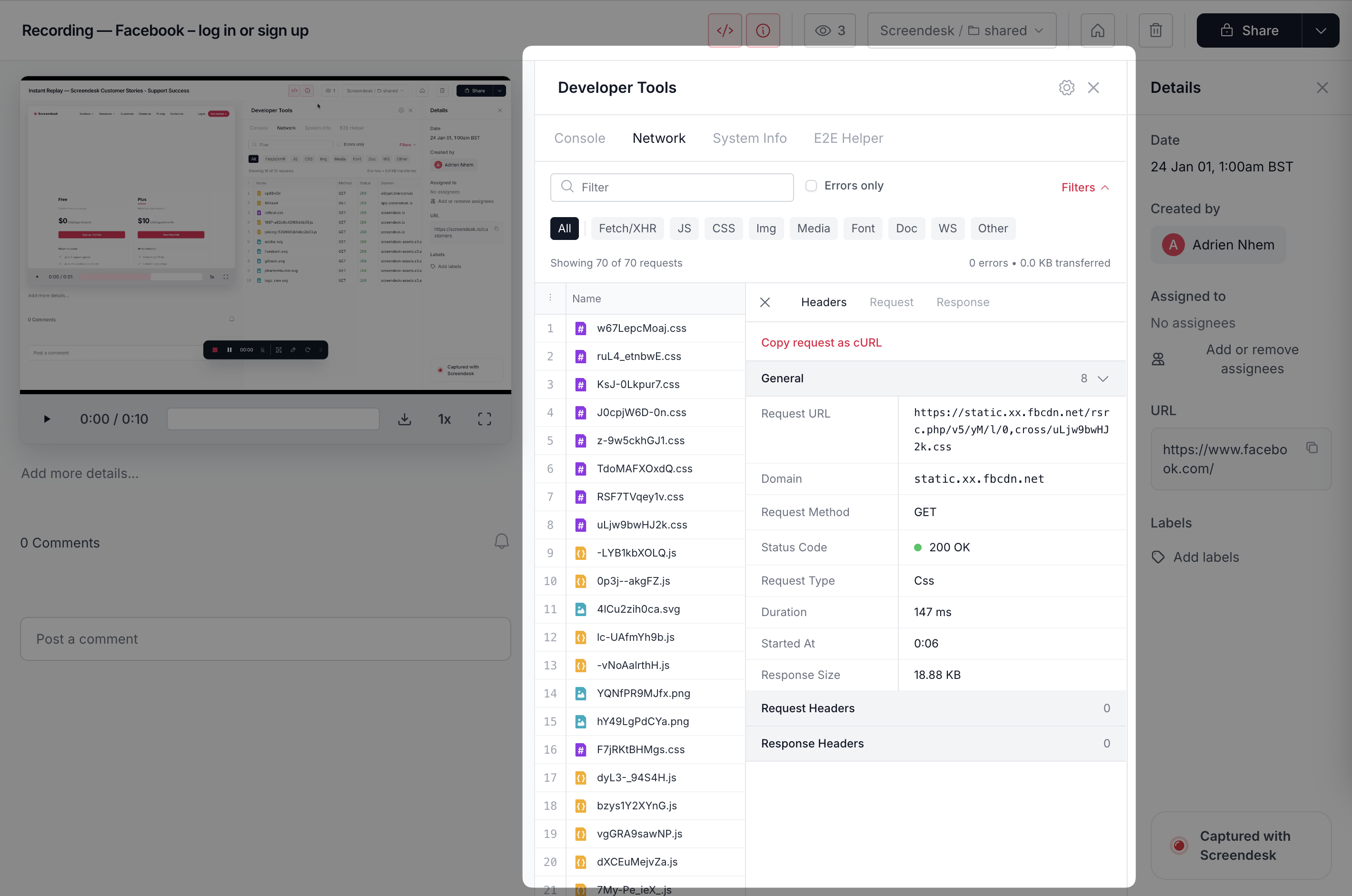
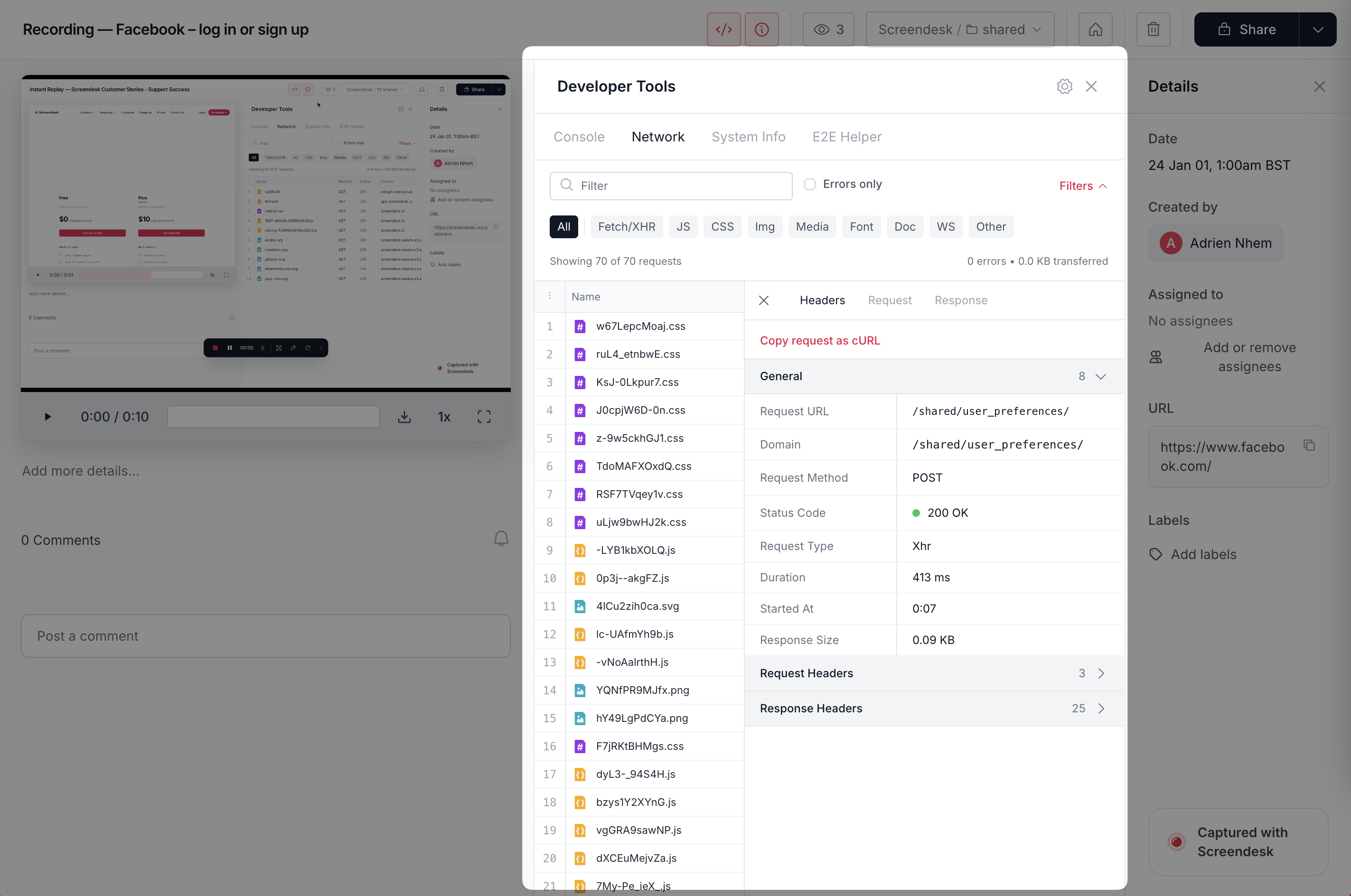
Network logs show what your app sent and received during a session. Use them to debug API failures, auth issues, and slow pages.
### Availability
Network logs are only available for certain capture types:
* ✅ Chrome extension recordings
* ✅ Replay-style captures (for example, Instant Replay)
* ✅ Standard customer-submitted recordings
{% hint style="info" %}
If you don’t see a **Network** tab, the recording type likely doesn’t support network capture.
{% endhint %}
### What gets captured
You can expect to see:
* Fetch/XHR requests
* Page navigations and redirects
* Static assets (JS, CSS, images, fonts)
* Third-party requests (analytics, CDNs)
* WebSocket connections (when present)
Per request, you typically get URL, method, status, timing, and a waterfall. You may also see headers, payload, and response data.
### Where to find it
{% stepper %}
{% step %}
**Open the recording**
Open the recording or capture in Screendesk.
{% endstep %}
{% step %}
**Open the Network tab**
Click **Network** in the developer tools panel.
{% endstep %}
{% step %}
**Filter to what matters**
Start with **XHR/Fetch**. Then enable **Errors only** if needed.
{% endstep %}
{% endstepper %}
### How to use network logs (fast workflow)
{% stepper %}
{% step %}
**Find the failing request**
Look for `4xx`, `5xx`, or `Failed`.
{% endstep %}
{% step %}
**Inspect details**
Check **Headers**, then **Payload**, then **Response**.
{% endstep %}
{% step %}
**Copy and reproduce**
Use **Copy as cURL** to reproduce outside the browser.
```bash
curl 'https://api.example.com/users/12345' \
-H 'Authorization: Bearer [REDACTED]' \
-H 'Content-Type: application/json'
```
{% endstep %}
{% endstepper %}
Common status codes and what to do
**`0` / Failed**
Usually CORS, blocked requests, timeouts, or a dropped connection.
Check console logs for CORS errors. Check system info for VPN/network hints.
**`401` Unauthorized**
Token missing or expired. Session issues are common.
Ask the user to log out/in. Check auth refresh logic.
**`403` Forbidden**
Auth is present. Permission is not.
Check roles, entitlements, and feature flags.
**`404` Not Found**
Bad URL or missing resource.
Check routing, environment (staging vs prod), and ID validity.
**`5xx` Server error**
Usually an engineering escalation.
Include URL, payload, response body, and timestamp in the ticket.
### Privacy and security
{% hint style="danger" %}
Network logs can include sensitive data. Treat them like production logs.
{% endhint %}
Be careful with auth headers, cookies, and PII in payloads/responses.
Recommended practices:
* Restrict access to technical roles.
* Redact tokens before sharing externally.
* Avoid screenshots of raw headers/payloads.
### Limitations
* Large request bodies may be truncated.
* File uploads can show as `[Binary Data]`.
* Some third-party requests may omit bodies due to browser restrictions.
* Static assets can appear, but the full body might not be stored.
### Related pages
* [Console logs and Network](https://docs.screendesk.io/~/revisions/pAg2d5GCwbZlpJ20UTRh/request-screen-recording/developer-tools/console-logs)
* [System Info](https://docs.screendesk.io/~/revisions/pAg2d5GCwbZlpJ20UTRh/request-screen-recording/developer-tools/system-info)
---
# Agent Instructions
This documentation is published with GitBook. GitBook is the documentation platform designed so that both humans and AI agents can read, navigate, and reason over technical content effectively. Learn more at gitbook.com.
## Querying This Documentation
If you need additional information that is not directly available in this page, you can query the documentation by asking a question.
Perform an HTTP GET request on the following URL with the `ask` and `goal` query parameters:
```
GET https://docs.screendesk.io/request-screen-recording/developer-tools/network-logs.md?ask=&goal=
```
`ask` is the immediate question: it should be specific, self-contained, and written in natural language.
`goal` is what the user is ultimately trying to achieve, the reason they need the answer. Sharing it helps GitBook give you a better, more relevant answer. A goal is most helpful when it describes the outcome the user wants rather than restating the question. For example, with `ask=how do I create an API token`, a goal like `automate deployments from our CI pipeline` lets GitBook tailor the answer to that use case.
The response will contain a direct answer to the question and relevant excerpts and sources from the documentation.
Use this mechanism when the answer is not explicitly present in the current page, you need clarification or additional context, or you want to retrieve related documentation sections.